



PVACreator Master Control Program (MCP) – Complete Guide
Overview
The PVACreator Master Control Program (MCP) is an advanced centralized automation and browser management system built into the PVACreator Browser. It allows users to register, manage, and control multiple accounts and browser profiles simultaneously from a single unified interface.
MCP is designed for users who need full browser-level automation, synchronization, and execution across multiple platforms.
Core Function: Centralized Multi-Account Management
Managing multiple accounts manually can be complex and time-consuming. MCP simplifies this process by allowing you to create, launch, and control multiple Outlook and platform accounts simultaneously.
With MCP, you can:
Register multiple Outlook accounts quickly
Launch multiple browser profiles at once
Manage accounts from one dashboard
No more manually open accounts individually
Maintain organized account control
This greatly improves workflow efficiency and scalability.
Full Browser Automation Control
The Master Control Program allows you to automate browser actions across multiple accounts without manual interaction.
Supported automated actions include:
Like posts
Comment on posts
Reply to comments
Publish posts
Perform engagement actions automatically
Navigate websites automatically
Execute workflows across multiple browser profiles
MCP acts as a centralized automation controller for all browser activities.
Automatic Account Login and Session Synchronization
One of the most important features of MCP is full session synchronization between PVACreator and the PVACreator Browser.
With MCP enabled:
Accounts open already logged in
No manual email or password entry required
Session cookies are transferred automatically
Authentication sessions remain intact
Browser profiles stay synchronized with created accounts
Bulk Browser Profile Control (Check Demo Video)
As demonstrated in the MCP video demo, the Master Control Program allows you to:
Launch multiple browser profiles simultaneously
Execute commands across multiple accounts at once
Monitor browser activity in real time
Control all profiles from a central control panel
This eliminates repetitive manual browser management.
Cross-Platform Automation Support
MCP supports automation across multiple platforms and services, including:
Outlook account management
Social media platform automation
Automatic Google Maps review workflows
Automatic browser interaction automation
Video synchronization and upload workflows
This allows centralized automation across multiple platforms.
Browser Fingerprint and Environment Control
The Master Control Program ensures that browser fingerprints and account environments remain consistent.
This includes:
Browser fingerprint synchronization
Session integrity protection
Consistent browser identity per account
Reduced login verification issues
This improves account stability and automation reliability.
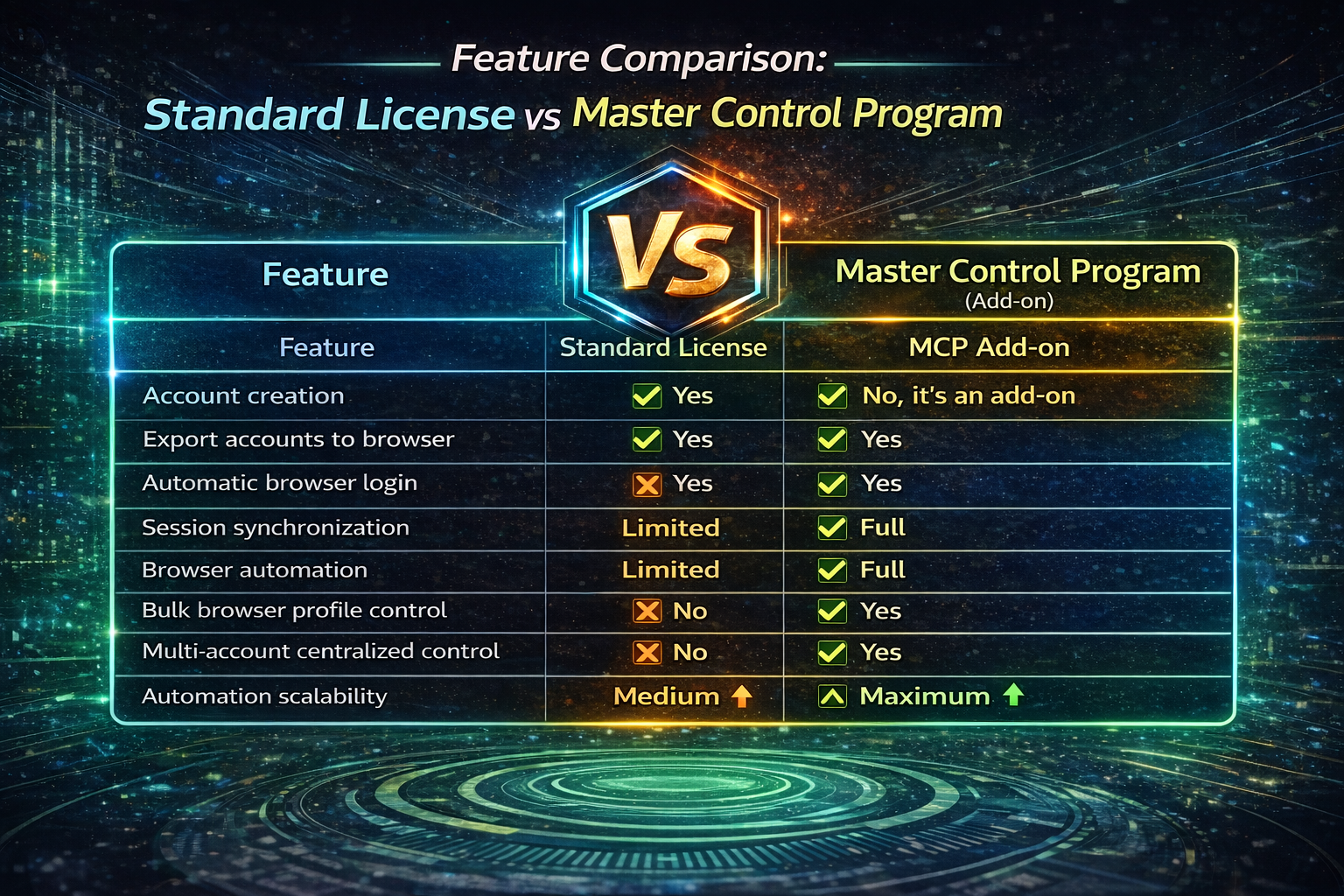
Why Master Control Program Is Required for Full Automation
Without MCP:
Session synchronization is incomplete
Browser automation is limited
Manual account management is required
With MCP:
Full session synchronization is enabled
Browser automation works seamlessly
Multiple accounts can be controlled simultaneously
MCP provides full automation infrastructure.
Feature Comparison: Standard License vs Master Control Program
Recommended Use Cases
The Master Control Program is recommended for:
Users managing multiple Outlook accounts
Automation professionals
Marketing agencies
Bulk account creators
Users scaling automation operations
Users needing full browser automation and synchronization
Workflow Example Using MCP
Step 1: Create accounts using PVACreator
Step 2: Export accounts to PVACreator Browser
Step 3: Launch profiles using MCP
Step 4: Accounts open fully logged in
Step 5:MCP automatically synchronizes sessions
Step 6: Run automation across multiple accounts simultaneously
No manual login or manual browser control required.
Key Benefits Summary
Centralized multi-account management
Automatic account login and synchronization
Full browser automation capability
Bulk browser profile control
Improved efficiency and scalability
Reduced manual work
Organized automation workflows
Summary
The PVACreator Master Control Program transforms the PVACreator Browser into a centralized automation and account management platform. It allows users to control multiple accounts, automate browser actions, synchronize sessions, and manage workflows efficiently.
For users managing multiple accounts or scaling automation operations, MCP is an essential module for achieving full automation and operational efficiency.