



How to Create Multiple Gmail Accounts Safely in 2026 (Complete Guide)
Gmail remains one of the most widely used email platforms in the world.
Businesses use Gmail accounts for:
- Team communication
- Customer support
- Marketing operations
- Software testing
- Project management
- Account recovery
- Business workflows
As online businesses continue to grow, many teams need more than one Gmail account.
However, creating and managing multiple accounts is not as simple as repeatedly signing up with the same information.
Google has invested heavily in security systems that detect unusual account creation patterns, suspicious activity, and automated behavior.
This means successful Gmail account management in 2026 requires a smarter approach.
In this guide, we will cover:
- Why businesses need multiple Gmail accounts
- Common problems when creating multiple accounts
- Best practices for safe Gmail account creation
- How to organize and manage multiple Gmail accounts efficiently
- How automation tools can simplify account workflows
Why Do People Need Multiple Gmail Accounts?
Before discussing account creation, it is important to understand why multiple Gmail accounts are useful.
1. Business Operations
Many companies separate email accounts by department.
For example:
Even smaller teams may need multiple accounts for different projects.
2. Testing and Development
Developers and marketers often require separate accounts for:
- Testing applications
- Managing trial accounts
- Software quality checks
- Workflow experiments
Using one personal account for everything can quickly become difficult to manage.
3. Team Management
Organizations often create dedicated accounts for employees, contractors, or temporary projects.
This makes it easier to:
- Control access
- Transfer ownership
- Maintain organization
- Protect business data
4. Digital Marketing Workflows
Modern marketing teams often manage multiple online assets, including:
- Social media profiles
- Advertising accounts
- Analytics tools
- Content platforms
Dedicated email accounts can help separate different business activities.
Why Creating Multiple Gmail Accounts Can Become Difficult
Many people assume they can simply create dozens of Gmail accounts quickly.
In reality, Google uses various security signals to protect its ecosystem.
Some common challenges include:
Phone Verification Requirements
Google may request phone verification during account creation.
This helps prevent:
- Spam accounts
- Fake registrations
- Automated abuse
The requirement can vary depending on many factors.
Account Security Checks
New accounts may receive additional verification requests if Google detects unusual patterns.
Examples include:
- Too many accounts created within a short period
- Inconsistent account information
- Suspicious login locations
- Unusual activity after registration
Managing Multiple Logins
After creating multiple accounts, another challenge appears:
How do you manage them efficiently?
Many users struggle with:
- Remembering passwords
- Switching accounts
- Keeping sessions organized
- Tracking recovery information
Account creation is only the first step.
Proper account management is equally important.
Best Practices for Creating Multiple Gmail Accounts Safely
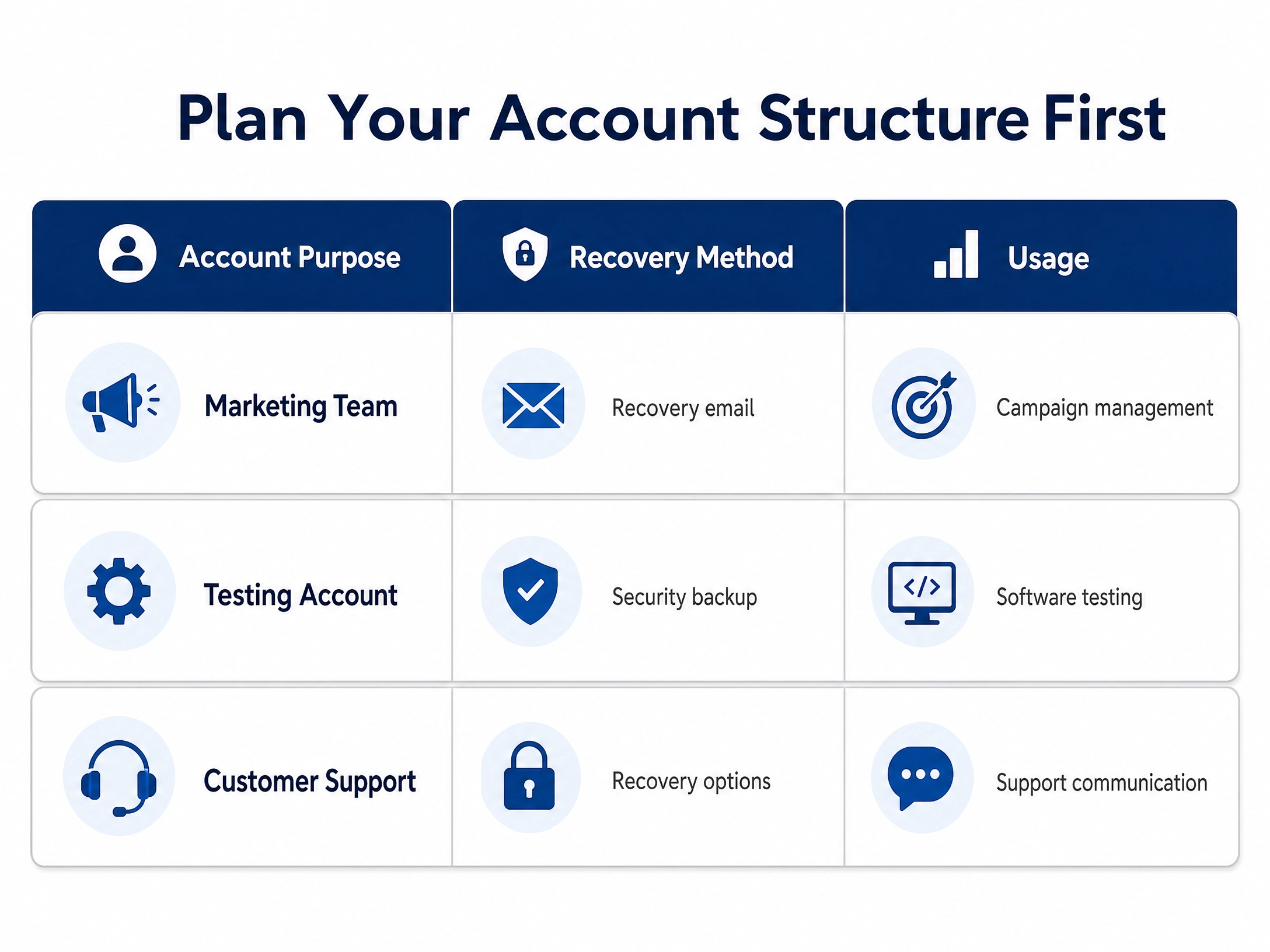
1. Plan Your Account Structure First
Before creating accounts, decide why each account exists.
Avoid creating random accounts without organization.
Create a simple tracking system with information such as:
2. Use Strong and Unique Passwords
Every Gmail account should have its own secure password.
Avoid:
- Reusing passwords
- Simple passwords
- Shared credentials
A password manager can help store and organize multiple accounts securely.
3. Enable Account Recovery Options
Account recovery is essential when managing multiple accounts.
Consider adding:
- Recovery email addresses
- Security information
- Backup authentication methods
Losing access to important accounts can disrupt business operations.
4. Keep Account Information Organized
When managing multiple Gmail accounts, organization matters.
Maintain records of:
- Account purpose
- Creation date
- Recovery information
- Associated projects
- Login status
A simple spreadsheet or account management system can prevent mistakes.
5. Avoid Creating Accounts Without a Purpose
More accounts do not automatically create more value.
Every account should have:
- A clear purpose
- A management plan
- A security strategy
Unused accounts create unnecessary maintenance.
Managing Multiple Gmail Accounts Efficiently in 2026
Creating accounts is only half the challenge.
The bigger challenge is daily management.
Businesses managing multiple accounts often need:
- Separate browser environments
- Organized login sessions
- Secure credential management
- Consistent workflows
This is where specialized account management solutions can help.
Using Browser Profiles for Better Account Organization
One common challenge with multiple accounts is session management.
Regular browsers store cookies, fingerprints, and login sessions.
When many accounts are used from the same browser environment, managing them becomes complicated.
A dedicated browser profile system allows users to separate:
- Cookies
- Sessions
- Browser settings
- Account environments
This makes managing multiple online accounts more organized.
How PVACreator Helps With Account Creation Workflows
For businesses that need to manage large-scale account creation workflows, tools like PVACreator are designed to simplify repetitive processes.
PVACreator focuses on helping users organize account creation workflows with features such as:
- Multi-platform account creation support
- Browser-based environments
- Account data management
- Workflow organization
The goal is not simply creating accounts faster.
The goal is creating a more structured and manageable process.
Common Mistakes When Managing Multiple Gmail Accounts
Mistake 1: Poor Account Organization
Creating many accounts without documentation creates problems later.
Always maintain clear records.
Mistake 2: Ignoring Security
Multiple accounts increase responsibility.
Make sure you use:
- Strong passwords
- Recovery options
- Secure storage methods
Mistake 3: Treating Every Account the Same
Different accounts may have different purposes.
A testing account and a business communication account should not necessarily follow the same workflow.
Mistake 4: Scaling Too Quickly Without Planning
Successful account management requires consistency.
A good system matters more than simply increasing account numbers.
The Future of Multiple Account Management
In 2026, online operations are becoming increasingly complex.
Businesses are managing:
- More platforms
- More customer interactions
- More marketing channels
- More digital identities
The future is not just about creating accounts.
It is about managing digital assets efficiently.
AI-powered workflows, automation, and better account organization systems are becoming essential for companies operating at scale.
Conclusion
Creating multiple Gmail accounts safely in 2026 requires more than repeating the signup process.
Successful management depends on:
Clear account purposes
Strong security practices
Organized workflows
Proper account management systems
Responsible usage
Whether you are managing business communication, testing environments, or digital marketing operations, having a structured approach will save time and reduce unnecessary problems.
The key is not creating the most accounts.
The key is building a reliable system that allows you to manage accounts effectively.